logologo
Search anything...
search_icon
search_iconAll
search_iconContinue Playing
search_iconHot Games
search_iconNew Games
search_iconSimulation
search_iconAdventure
search_iconAction
search_iconStrategy
search_iconCasual
search_iconRacing
search_iconPuzzle
search_iconSports
search_iconMore
AboutAbout
BusinessBusiness
PrivacyPrivacy
TermsTerms

© 2026 minigame.com

mascot

Join The Minis With Friends

search_icon
search_icon
search_icon
search_icon
search_icon
search_icon
search_icon
search_icon
search_icon
search_icon
search_icon
search_icon
more_icon
AboutBusinessPrivacyTerms
Your browser does not support the video tag or this video format.
Play Now
Construction Set

Construction Set

Construction Set
Play Now
Like
Dislike
Add to favorites
Feedback

Recommended

Yeloli Princess Makeup
Jelly Crush
Ninja Legend
Cube Mania
Pets Match
Hoop Stars
Shopping Mall Tycoon
Fruit Master
Stone Line
My Field
Mutant Dinosaurs
Jelly Boom
Yeloli Dress Up
Royal Battle
Love Challenge
Ninja Sword
Idle Rancher

Idle Rancher

Idle Rancher
Idle Rancher608.4K
Chop.io

Chop.io

Chop.io
Chop.io1.3M
Pop Stone2

Pop Stone2

Pop Stone2
Pop Stone24.8M
Mecha Beasts

Mecha Beasts

Mecha Beasts
Mecha Beasts278.4K
Bubble Legend

Bubble Legend

Bubble Legend
Bubble Legend1.2M
Crazy Ball

Crazy Ball

Crazy Ball
Crazy Ball667.7K
Bubble Spinner

Bubble Spinner

Bubble Spinner
Bubble Spinner1.1M
Tiny Clash

Tiny Clash

Tiny Clash
Tiny Clash246.5K
Best Link

Best Link

Best Link
Best Link359.0K
My Fairies Dress Up

My Fairies Dress Up

My Fairies Dress Up
My Fairies Dress Up137.9K
AboutBusinessPrivacy
logo

© 2026 minigame.com

Games>
Puzzle>
Construction Set

Construction Set

Rating
5
Orientation
Portrait
Release Date
2023-04-21
Puzzle

What is Construction Set

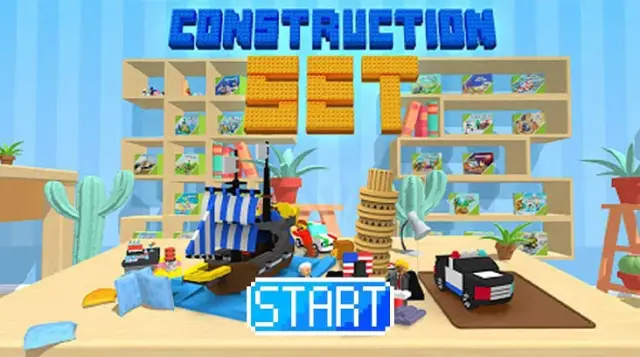
"Construction Set" brings the joy and satisfaction of building block toys right to your fingertips! This relaxing hyper-casual game combines the fun of hidden object puzzles with the reward of 3D model construction. Start by opening a brand-new box of virtual mini-bricks and emptying the packet onto your table. Your task is to look at the required piece shown in the "Find" box and spot it among the scattered blocks. Once you tap the correct piece, it magically flies into place, slowly building a delightful 3D model. From simple bicycles to complex amusement park rides, each level offers a new, colorful creation. As you complete models, you will earn coins and add your masterpieces to your virtual display shelf. It’s the perfect, stress-free game for puzzle lovers and building block enthusiasts alike!

Key Game Features

3D Brick Building: Watch beautiful models come to life piece by piece. Find & Match Gameplay: Test your observation skills by finding the right blocks. Satisfying Collection: Build a massive collection of toys, vehicles, and more. Relaxing Atmosphere: Enjoy a stress-free experience with soothing ASMR sounds. Simple Controls: Easy one-finger tap mechanics suitable for everyone. Room Customization: Use earned coins to unlock new wallpapers and floors.

How to Play & Master

Playing "Mini Brick Puzzle" is straightforward and satisfying. Unboxing: Press and hold the screen to open the model box, then swipe to tear open the plastic packet and scatter the pieces on your virtual desk. Finding Pieces: Look at the top right corner of the screen where it says "Find." It will show an image of a specific brick or part you need next. Selecting: Scan the scattered pieces on your desk and tap the one that exactly matches the required part. Building: If you select the right piece, it will automatically fly up and snap into its correct position on the model. Mistakes: You have 3 lives (hearts). If you tap the wrong piece, you lose a heart. Take your time and observe carefully! Completion: Continue finding pieces until the entire 3D model is built. The finished model will then be placed on your display shelf!

Game Controls

Tap: Select the matching scattered brick. Hold & Swipe: Used during the unboxing and packet-opening animations.

Frequently Asked Questions (FAQ)

Q: What happens if I lose all my hearts? A: If you select the wrong piece 3 times, you may have to restart the level or watch an ad to revive and continue building. Q: What are the coins used for? A: Coins earned from completing models can be used to customize your virtual room, such as buying new wallpapers or flooring. Q: Is there a time limit? A: No, there is no timer. You can relax and take as long as you need to find the pieces.

Games>
Puzzle>
Construction Set

Construction Set

Rating
5
Orientation
Portrait
Release Date
2023-04-21
Puzzle

What is Construction Set

"Construction Set" brings the joy and satisfaction of building block toys right to your fingertips! This relaxing hyper-casual game combines the fun of hidden object puzzles with the reward of 3D model construction. Start by opening a brand-new box of virtual mini-bricks and emptying the packet onto your table. Your task is to look at the required piece shown in the "Find" box and spot it among the scattered blocks. Once you tap the correct piece, it magically flies into place, slowly building a delightful 3D model. From simple bicycles to complex amusement park rides, each level offers a new, colorful creation. As you complete models, you will earn coins and add your masterpieces to your virtual display shelf. It’s the perfect, stress-free game for puzzle lovers and building block enthusiasts alike!
Key Game Features

3D Brick Building: Watch beautiful models come to life piece by piece. Find & Match Gameplay: Test your observation skills by finding the right blocks. Satisfying Collection: Build a massive collection of toys, vehicles, and more. Relaxing Atmosphere: Enjoy a stress-free experience with soothing ASMR sounds. Simple Controls: Easy one-finger tap mechanics suitable for everyone. Room Customization: Use earned coins to unlock new wallpapers and floors.

How to Play & Master

Playing "Mini Brick Puzzle" is straightforward and satisfying. Unboxing: Press and hold the screen to open the model box, then swipe to tear open the plastic packet and scatter the pieces on your virtual desk. Finding Pieces: Look at the top right corner of the screen where it says "Find." It will show an image of a specific brick or part you need next. Selecting: Scan the scattered pieces on your desk and tap the one that exactly matches the required part. Building: If you select the right piece, it will automatically fly up and snap into its correct position on the model. Mistakes: You have 3 lives (hearts). If you tap the wrong piece, you lose a heart. Take your time and observe carefully! Completion: Continue finding pieces until the entire 3D model is built. The finished model will then be placed on your display shelf!

Game Controls

Tap: Select the matching scattered brick. Hold & Swipe: Used during the unboxing and packet-opening animations.

Frequently Asked Questions (FAQ)

Q: What happens if I lose all my hearts? A: If you select the wrong piece 3 times, you may have to restart the level or watch an ad to revive and continue building. Q: What are the coins used for? A: Coins earned from completing models can be used to customize your virtual room, such as buying new wallpapers or flooring. Q: Is there a time limit? A: No, there is no timer. You can relax and take as long as you need to find the pieces.